Resident Center
- 4.5
- Rating
- 500.00K
- Installs
- Free
- Price

 Analysis by App-foxy
Resident Center is the kind of House & Home app I would reach for when I want one place for day-to-day communication with the property team instead of searching through old emails, paper notices, and separate payment pages. Developed by Buildium, it is a free resident-facing app with a straightforward purpose: make routine property matters easier to find and manage from a phone.
After spending time with Resident Center, my impression is that its biggest strength is not flashy design but reduced friction. The experience is built around simplicity, which matters when you are checking a notice quickly, trying to understand what needs attention, or handling a household task between work, travel, and family responsibilities. It is rated for Everyone, and that broad age rating fits the practical nature of the app, although ease of use can still depend on the property’s setup and the user’s own needs.
How Resident Center feels to use in everyday housing tasks
I find the app most useful when I treat it as a focused home for property-related tasks, rather than another general-purpose organizer. That distinction helps me decide what belongs here and what is better handled by email, a call, or a household calendar. Next, I’ll look at how that focused approach can shape a practical routine without making the app responsible for every part of home administration.
You May Also Like

 Blood Strike: 2.5 Anniversary
Blood Strike’s Loadouts Turn Every Drop Into a Tactical Gamble
A close look at Blood Strike’s custom loadouts: how fast access to signature weapons reshapes its battle royale rhythm, rewards preparation, and narrows the gap between fights.

 Pandora - Music & Podcasts
Pandora’s Music Is Easy to Start, but Harder to Recover
Pandora’s strength is its low-effort path from a seed to a station. Its weak spot is how much confidence it asks you to place in connection, setup, and quiet recovery.

 8 Ball Pool
 Is Built on Rivalries, Rematches, and Routine
A close look at the rivalries, rematches, shared routines, and unanswered safety questions that turn a quick pool match into a persistent mobile community.

 Samsung Music
’s Quiet Strength Is Playing What You Already Own
Its reach comes less from spectacle than from dependable access to a personal library. That simplicity is both the app’s strongest retention engine and its ceiling.

 AccuWeather: Weather Radar
AccuWeather Review: A Quick, Clear Forecast for Everyday Decisions
For everyday plans, the best forecast is the one you can understand quickly. AccuWeather makes rain timing, radar, and local conditions easy to act on, with a few trade-offs.

 Hill Climb Racing
Why Hill Climb Racing Still Turns Crashes Into One More Run
A tiny car, a bumpy hill and one more upgrade: Hill Climb Racing keeps resurfacing because its simple chaos makes every near-miss feel personal.
More From Our News Desk



Readability and navigation that favor quick checks
The first thing I noticed is that Resident Center makes more sense when treated as a resident dashboard than as a general-purpose social or productivity app. I would not open it to browse around for entertainment. I would open it because I need to check a housing-related item, find a message, or complete a task connected with where I live. That focused purpose helps keep the mental load low.
The app’s simplicity is especially useful for people who dislike digging through menus. A resident should not have to remember whether a building announcement arrived by email, appeared on a noticeboard, or was sent through a separate messaging tool. Keeping property communication in a dedicated space can make the next action clearer. In my experience, that is valuable for anyone who manages a busy household and wants fewer places to monitor.
There is also a practical readability benefit in having housing information separated from the noise of a normal inbox. Email threads often mix advertisements, personal messages, automated receipts, and old conversations. Resident Center gives property-related matters their own context, so I can approach them with the right mindset. That does not automatically make every message easy to understand, of course; a confusing notice remains confusing. But the app can make the surrounding workflow less distracting.
One useful habit is to open the app at a calm moment rather than only when something goes wrong. I would use a short weekly check to look for new resident communication and confirm that nothing needs action. This is a small routine, but it can help people who find scattered reminders difficult to track. It also reduces the chance of overlooking an important update simply because it was buried in a crowded inbox.
The app is a good fit for residents who prefer visual, step-by-step interaction over phone calls. Someone who feels uncomfortable explaining a maintenance concern verbally may find it easier to read the available information and respond in writing. On the other hand, a person who expects detailed customization, advanced household organization, or a full property-management workspace may find the focused layout too limited. Resident Center is designed for the resident side of the relationship, not for replacing every tool used by a landlord or management company.
Motor and sensory considerations in real use
For users with motor difficulties, a mobile app can be helpful because it avoids some physical tasks associated with paper forms, office visits, or repeated phone calls. Tapping through a resident workflow from a familiar device may be easier than handling documents or waiting for a staff member to be available. The benefit is strongest when the user already has a comfortable phone setup, such as a preferred screen size, touch sensitivity, or system-level assistance.
I would still be careful about assuming that a simple interface is automatically accessible to everyone. A clean layout can reduce confusion, but it does not tell us how every control behaves with a particular assistive technology, enlarged text setting, or alternative input method. Users who rely heavily on screen readers, switch access, voice control, or other specialized tools should test the current version on their own device before making it their only route to property communication.
For people with sensory sensitivities, the narrow purpose of the app may be an advantage. There is less reason to linger, scroll through unrelated content, or process a stream of social updates. I can imagine using it in a quiet, low-stimulation way: open the app, read the relevant item, complete the necessary step, and close it. That kind of contained interaction is preferable to a platform that constantly competes for attention.
Users with visual fatigue may benefit from handling one housing task at a time rather than trying to interpret a long chain of email replies. My practical suggestion is to adjust the phone’s display settings first, then use Resident Center in the environment where you normally manage household administration. Larger text, stronger contrast, or a slower interaction pace can make a bigger difference than switching between several apps. These are device-level strategies rather than special claims about the app itself, but they are realistic ways to make the experience more comfortable.
People with hearing-related access needs may appreciate written communication where the property workflow supports it, especially when a phone conversation is inconvenient or difficult. Still, the usefulness depends on how the resident’s management team communicates. An app cannot turn an incomplete notice into a complete one, and written access is only helpful when the important information is actually delivered in writing.
Situational access for busy, remote, and changing households
Resident Center becomes more valuable when access to the property office is inconvenient. Imagine a resident who notices a housing issue after returning from work, has limited time during office hours, and does not want to reconstruct the problem from memory the next morning. A dedicated resident app can provide a more direct starting point than searching for the correct contact address or trying to remember which web page handles the request.
It can also suit people who move between locations during the day. A student, shift worker, caregiver, or frequent traveler may not be near a computer when a property update arrives. Having a resident-focused mobile option means the person can check housing information from the device already used for most daily tasks. That does not guarantee that every action can be completed at any time, but it makes the first step less dependent on being at home or in an office.
For shared households, I would treat the app as a coordination aid rather than assuming it replaces household communication. One person can review a property message and then tell the others what matters, while the household keeps its own decisions and reminders elsewhere. This division is useful because property communication and personal household planning are not always the same thing. Resident Center can help surface the official side without becoming the family’s entire organizational system.
Another realistic scenario involves a resident who is anxious about making a mistake. A focused app can feel less intimidating than calling a busy office and improvising an explanation. I would prepare the relevant details before opening the app: what happened, where it happened, when it started, and what outcome is needed. That preparation makes the interaction clearer and reduces repeated back-and-forth, particularly for users who need extra time to compose a message.
The app may also be useful for people who are not confident with desktop software. A phone-first approach can be more familiar than navigating a property website with several sections and account screens. At the same time, residents who manage long documents, compare multiple records, or need to type detailed explanations may still prefer a computer when one is available. Mobile convenience and large-screen comfort are not always the same thing.
Where the experience still has barriers
The most important limitation is that Resident Center is only one part of the housing process. The property manager’s participation determines how useful the app feels. If communication is delayed, instructions are vague, or residents are still asked to use unrelated channels for different tasks, the app cannot create a fully unified experience on its own. This is a crucial distinction: a simple resident interface can improve access to a process, but it cannot repair a disorganized process behind it.
I would also avoid assuming that mobile access is universally convenient. Some people share a device, have limited storage, use an older phone, or prefer not to handle housing matters on a small screen. Others may have unreliable connectivity while traveling or may need a printed record for personal organization. For these residents, an app-only expectation could become a barrier rather than a convenience. Resident Center works best as an accessible option within a broader communication approach, not as a reason to remove every alternative.
There is a cognitive barrier worth mentioning too. Even a simple app can become stressful when a user is dealing with an urgent repair, a confusing charge, or a sensitive housing concern. Clear navigation helps, but the emotional context still matters. I recommend taking a screenshot or writing down the key details of an important interaction for your own records, while remembering that a personal note is not a substitute for the official message or response.
Language and literacy can affect the experience as well. A resident may understand the app’s navigation but struggle with property-specific terminology in a notice. In that situation, the best approach is to identify the exact phrase that is unclear and ask the management team for an explanation rather than guessing. The app can provide a channel for that conversation, but it does not remove the need for plain language from the sender.
Privacy and device sharing are practical considerations. Anyone using a shared phone should think about who can see resident communication when the device is unlocked. I would use the phone’s normal security features and avoid leaving sensitive screens open. This is not a criticism unique to Resident Center; it is part of using any housing-related app on a personal or shared device.
What the current edition tells me about support and fit
The current version is 1.5.6, and the app has been available since Aug 7, 2019. That history suggests a product intended for an established resident workflow rather than a temporary experiment. Its presence on the market has also given it time to become familiar to many residents: it has more than one hundred thousand installs, an average rating of 4.5, and around twenty-two thousand ratings.
Those figures make Resident Center look reassuring for someone who wants a commonly used option, but I would not treat popularity as proof that it will fit every building or every accessibility need. Ratings usually reflect a mixture of app performance, property communication, and individual expectations. My own decision would depend more on whether the management company actively uses it and whether its interaction style suits the resident’s device and abilities.
The minimum operating-system requirement is iOS 12 or later. That is worth checking before planning to depend on the app, especially if you keep an older device for household administration. A resident with an incompatible phone may need another way to communicate with the property team, so compatibility should be checked early rather than discovered during an urgent situation.
Because the app is free, the main trade-off is not an upfront purchase. The real question is whether it saves enough time and confusion to justify adding another account and another place to check. For a resident whose building already relies on Buildium’s resident workflow, the answer is likely yes. For someone whose property team rarely updates the platform, the app may sit unused even though it costs nothing.
Who should choose it, and who should look elsewhere
I would recommend Resident Center to renters and other residents who want a dedicated mobile route for property communication and routine housing administration. It is particularly appealing to people who dislike phone calls, need to manage tasks outside office hours, or want to separate building information from personal email. Its simplicity can also help users who feel overwhelmed by broader property portals packed with unrelated options.
I would be more cautious if you need a highly detailed desktop workspace, extensive personal record-keeping, or guaranteed compatibility with a specialized accessibility setup. In those cases, a full web portal, direct email, telephone support, or an in-person option may be better as a primary method. The right choice is not always the most modern one; it is the method that lets you understand, complete, and document a housing task reliably.
Compared with ordinary email, Resident Center offers a more focused home for resident matters, but email remains useful when you need to preserve a long written conversation or include people outside the resident workflow. Compared with a phone call, the app can reduce pressure and create a more deliberate written interaction, while a call may be faster for an urgent or complicated explanation. Compared with visiting the office, it removes travel and waiting, but it cannot provide the immediate human clarification that some situations require.
My best practical advice is to keep a backup contact method even if the app works well. Save the property office’s normal contact details, learn which situations require immediate direct help, and do not wait for an app response when safety or serious damage is involved. This approach treats the app as a useful access point rather than pretending that one channel can handle every housing problem.
An inclusive verdict for everyday residents
Resident Center succeeds when the goal is clear, focused access to property-related communication from a phone. I like that its design direction favors simplicity instead of trying to become a complete digital life platform. That focus can support different routines: a quick check for a busy worker, a written route for someone uncomfortable with calls, or a convenient mobile option for a resident who cannot visit the office easily.
Its inclusive value has limits, and those limits are important. Accessibility depends not only on the app’s navigation but also on the phone, the resident’s preferred tools, the clarity of property messages, and the management team’s willingness to communicate consistently. People with older devices, shared phones, specialized assistive technology, or a strong preference for large-screen work should test the fit before relying on it.
Overall, I see Resident Center as a sensible choice for residents whose property already uses the Buildium ecosystem and who want less scattered communication. It is free, aimed at Everyone, and supported by a substantial user base, but its strongest recommendation is practical rather than numerical: it can make ordinary housing tasks feel more contained. My advice is to use it as the convenient first stop, while keeping a clear backup route for urgent, complex, or accessibility-sensitive situations.
FAQs for Resident Center
01What is Resident Center and what does it offer?
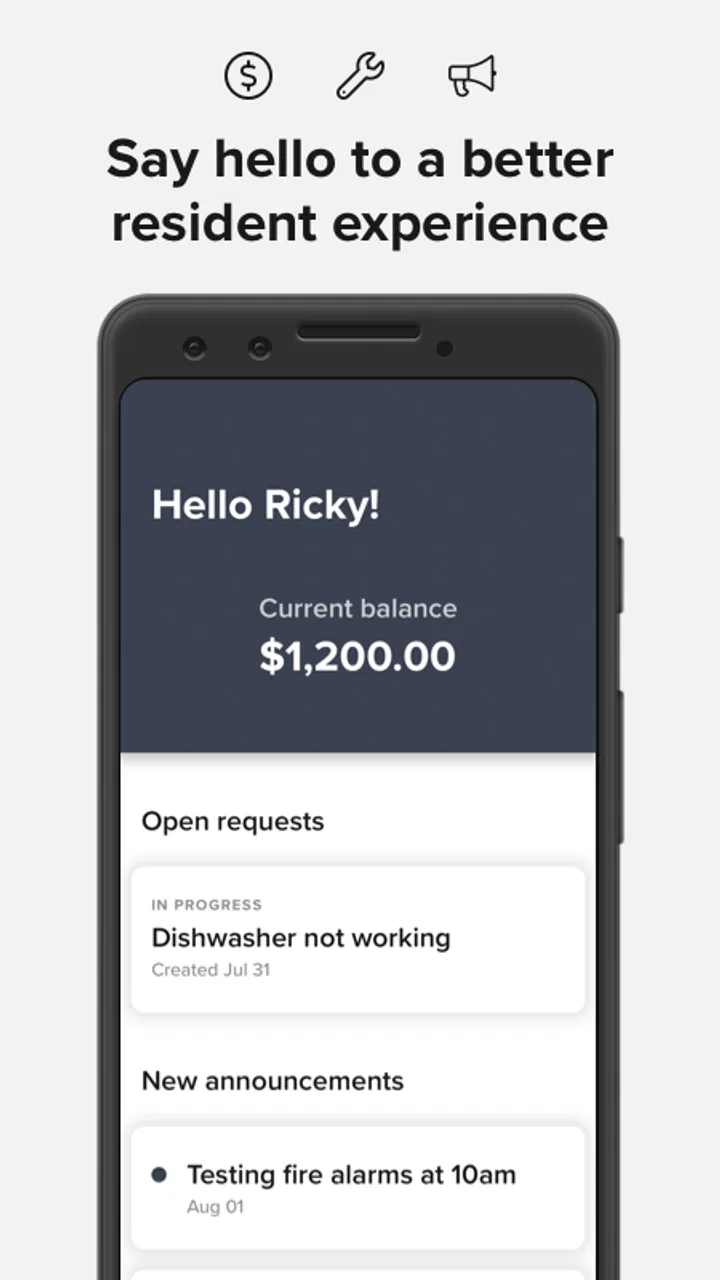
Resident Center is a comprehensive app designed to streamline communication between residents and property management. It offers features such as online rent payments, maintenance requests, community announcements, and access to important documents. The app aims to improve the efficiency of managing residential properties by providing a centralized platform for all resident-related activities.
02Is Resident Center available on both Android and iOS platforms?
Yes, Resident Center is available for download on both Android and iOS devices. Users can find the app on the Google Play Store for Android and the Apple App Store for iOS. This cross-platform availability ensures that residents can access all features regardless of their device preference.
03How secure is the Resident Center app for making payments?
Resident Center prioritizes user security, especially when it comes to financial transactions. The app employs encryption and other security measures to protect personal and payment information. However, users should always ensure they are using the latest version of the app and follow best practices for online security to safeguard their data.
04Can multiple residents from the same household use the app?
Yes, multiple residents from the same household can use the Resident Center app. Each resident can create their own account to access the app’s features. This allows for personalized experiences and ensures that all household members can stay informed about community updates and manage their responsibilities effectively.
05What should I do if I encounter issues while using Resident Center?
If you encounter any issues while using Resident Center, there are several steps you can take. First, check for updates to ensure you are using the latest version of the app. If the problem persists, contact the support team through the app’s help section or visit their official website for further assistance. They provide support to resolve technical difficulties and improve user experience.
Pros
- Intuitive user interface for easy navigation.
- Real-time notifications for important updates.
- Secure payment options for rent and fees.
- 24/7 access to lease documents and history.
- Responsive customer support team.
Cons
- Limited customization for user preferences.
- Occasional glitches in notification delivery.
- Requires stable internet for optimal use.
- No offline access to key features.
- Some features locked behind premium plans.

Resident Center
Gallery